
 Visit PTZOptics.com
Welcome to Intelligent Video.
Smarter cameras. Simpler control. Scalable video workflows.
The PTZOptics Story
A camera company built from an integration company — designed by people who understand what actually happens in real AV spaces.
Built by AV People
Born from real integration experience. Haverford Systems AV roots date to 1987.
From Rooms to Workflows
Cameras • Control • Automation • Remote Production

Local Roots, Global Reach
Downingtown, Pennsylvania • 120+ countries served
What Makes Us Different
Unrivalled 5-Year Warranty
Five years on cameras, ten years on cables and mounts.
Trusted by Professionals Worldwide
Organizations across 120+ countries rely on PTZOptics.
Worldwide Market Ecosystem
Installs in Apple, Harvard, and Major League Sports.
Award-Winning Support
Backed by forever support from the PTZOptics team.
From our first PTZ camera to today’s intelligent video and production solutions, our mission remains the same: to empower everyone with video technology that is powerful, flexible, and easy to use.
Three Pillars
Cameras That Perform
One line for Pro AV rooms and broadcast sets — from the Move 4K flagship to the entry Studio SE.
- New Rise 4K: Gen Lock, Timecode and a 1-inch sensor
- Automation and AV over IP workflows
- Accessible API for any control stack
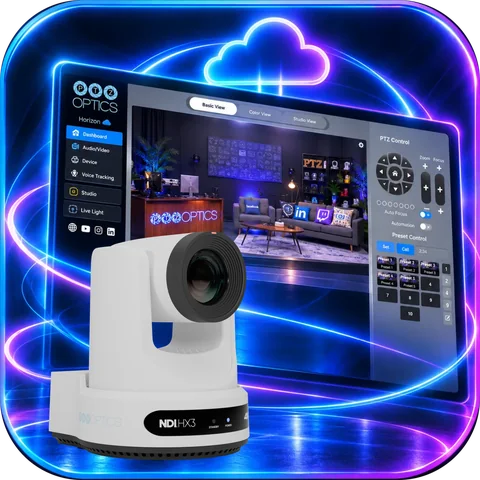
Software That Simplifies
Horizon Hub puts every PTZOptics app in one place — no more app-hopping.
- Desktop Control for in-room operation
- Device Manager updates the whole fleet at once
- Voice Tracking follows the speaker, no operator

Workflows That Scale
Expand workflows with fixed-frame cameras or push the Move 4K with FreeD or advanced automation.
- One camera for many spaces, stage to conference room
- Wi-Fi 6 connectivity and power with the Power+Link.
- Over 100 hardware and software partner integrations
What Makes Us Different
Unrivalled 5-Year Warranty
Five years on cameras, ten years on cables and mounts.
Trusted by Professionals Worldwide
Organizations across 120+ countries rely on PTZOptics.
Worldwide Market Ecosystem
Installs in Apple, Harvard, and Major League Sports.
Award-Winning Support
Backed by forever support from the PTZOptics team.
Industries We Serve

ProAV
Industrial & Manufacturing
Courts & Legal
Healthcare

Broadcast
Houses of Worship
Podcasting & Content Creation
Entertainment & Live Events
Sports & Esports

ProAV + Broadcast
Education
Corporate
Healthcare Education
Government & Public Sector
Top Sellers (MAP)
Product Portfolio
Quick Links
Warranty
Ten Years on cables and mounts.
Five years on cameras.
Two years on joystick controllers.
Forever support.
Contacts
Sales
Phone: 1-833-888-9706
Email: partners@ptzoptics.com
Hours: Mon–Thu 8am–6pm ET
Support
Phone: 1-833-888-9706
Email: support@ptzoptics.com
Hours: Mon–Thu 8am–6pm ET • Fri 8am–4pm ET
| Product | Sensor | Codec | NDI | PoE | IP | Audio | Tally | Warranty |
|---|---|---|---|---|---|---|---|---|
| Move 4K | 1/1.8" Sony CMOS | H.264 / H.265 | HX3 | PoE+ | Indoor | 3.5mm in/out | Yes | 5 yr |
| Link 4K | 1/1.8" Sony CMOS | H.264 / H.265 / Dante AV-H | HX3 | PoE+ | Indoor | 3.5mm in/out | Yes | 5 yr |
| Move SE | 1/2.8" Sony CMOS | H.264 / H.265 | HX3 | PoE+ | Indoor | 3.5mm in | - | 5 yr |
| Rise 4K | 1/1.8" Sony CMOS | H.264 / H.265 | HX3 | PoE+ | Indoor | 3.5mm in/out | Yes | 5 yr |
| Studio 4K | 1/1.8" Sony CMOS | H.264 / H.265 | HX3 | PoE+ | Indoor | 3.5mm in/out | Yes | 5 yr |
| Studio SE | 1/2.8" Sony CMOS | H.264 / H.265 | HX3 | PoE+ | Indoor | 3.5mm in/out | Yes | 5 yr |
| SimplTrack 3 | 1/2.8" Sony CMOS (x2) | H.264 / H.265 | HX2 | PoE+ | Indoor | 3.5mm in | - | 5 yr |
Find My Camera
Answer three quick questions and we'll match you to the right PTZOptics camera.
Bundles
Build a complete multi-camera production system with cameras and control designed to work together. From live sports and professional productions to fully customized installations, PTZOptics bundles make it easier to choose the right equipment, simplify setup, and get more value from your investment.
Action 4K Bundle
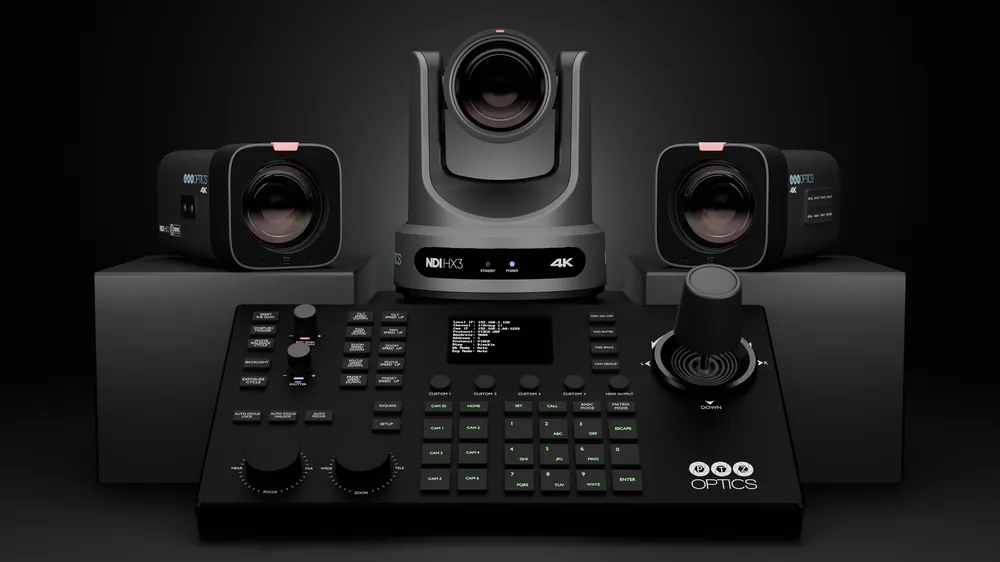
Designed for live sports production, the Action 4K Bundle combines a Move 4K PTZ camera, two Studio 4K fixed cameras and a SuperJoy controller. Capture wide coverage, goal-line views and close-up action in stunning 4K - while one operator manages the entire production from a centralized control surface.
Ideal for: Sports fields, courts, arenas, and other action-focused productions.
Includes: 1x Move 4K 12X + 2x Studio 4K 12X + SuperJoy
MAP: $5,297
Producer 4K Bundle
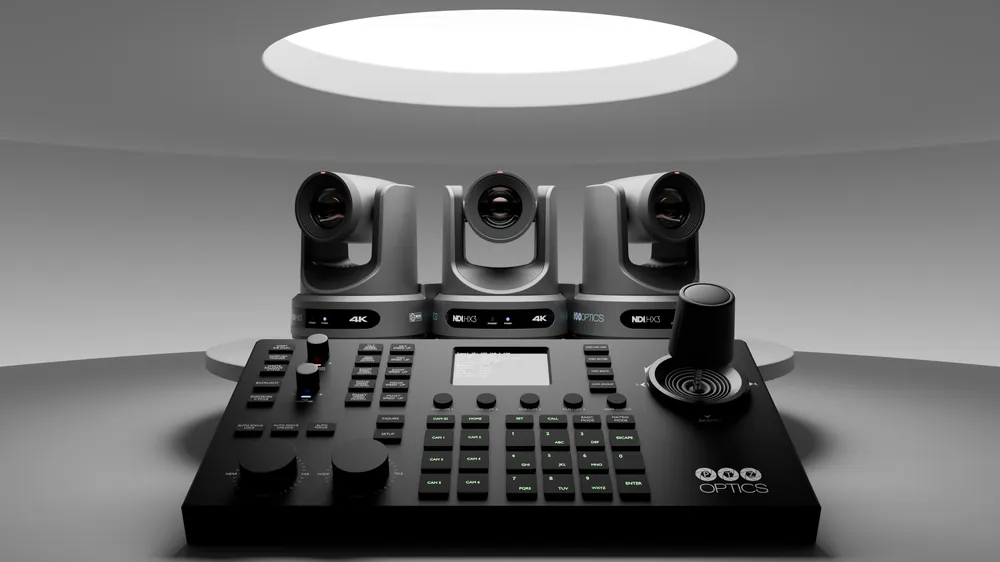
Create polished, professional productions with three Move 4K PTZ cameras and the advanced control of the SuperJoy. With 4K video, 20X optical zoom, built-in auto-tracking and flexible SDI, HDMI, USB and IP connectivity, the Producer 4K Bundle gives small teams everything they need to produce compelling multi-camera content.
Ideal for: Studios, live events, houses of worship, education, and professional streaming.
Producer 4K Bundle: 3x Move 4K 20X + SuperJoy - $7,756 MAP
Producer SE Bundle: 3x Move SE 20X + PT-JOY-G4 - $4,743 MAP
Producer 4K 30X Bundle: 3x Move 4K 30X + SuperJoy - $8,732 MAP
Flex Bundles
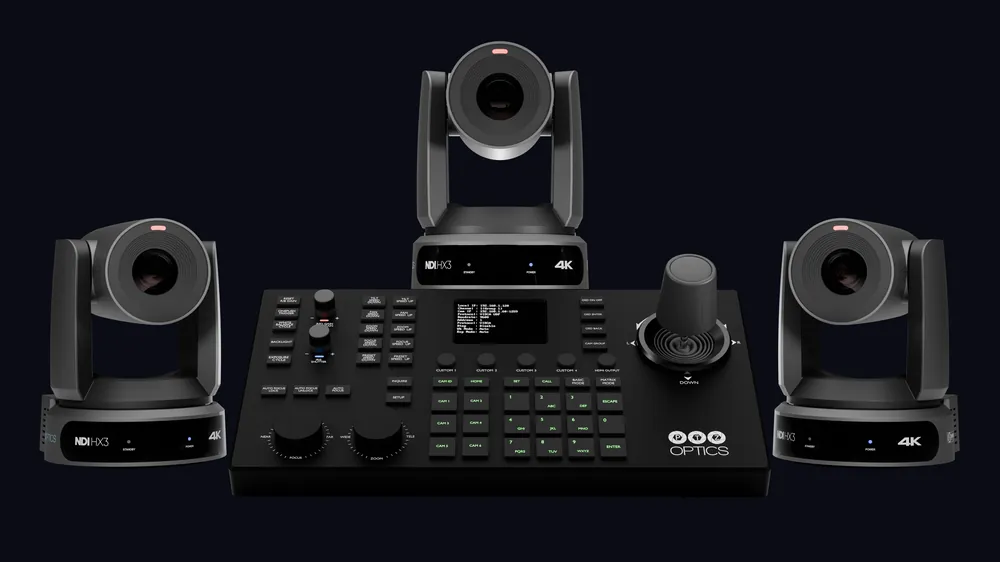
Every project is different. Flex Bundles let you mix and match eligible PTZOptics cameras and controllers to build a solution around your space, production requirements and budget. Choose the equipment you need, simplify purchasing and receive exclusive bundle savings - all without being limited to a predetermined configuration.
Ideal for: Custom installations, expanding systems, and specialized production workflows.
Product Portfolio
Standardized product information — all data from a single source.
Pricing
MAP (Minimum Advertised Pricing). Current pricing snapshot.
Where to Buy
Find the best reseller or distributor for your region.
PTZOptics Sales Leadership
Battlecards
Objection Handling
Real customer concerns, stronger discovery questions, practical PTZOptics responses, competitive pivots, and clear next steps.
How to Handle an Objection
Choose Your Optical Zoom
Match the right zoom to your space and distance.
Room Size
Field of View Preview
Detailed Comparison
SuperZoom — Double Your Optical Zoom
Move 4K and Link 4K cameras can double their optical zoom with no quality loss. Output in 1080p and the 4K sensor crops into the frame, turning your optical reach into an effective zoom that’s 2X further.
How it works: The native 4K sensor captures a wider FOV. When you output 1080p, the camera crops into that 4K frame, doubling your effective reach while maintaining full HD quality. No additional hardware. No quality loss.
Available on: Move 4K (12X, 20X, 30X) and Link 4K (12X, 20X, 30X).
Horizon
The Updated, Upgraded, and Optimized User Interface for Your PTZOptics Cameras
What is Horizon?
Horizon is the next-generation web interface from PTZOptics, designed to elevate the performance of your cameras to new creative heights. Built with cutting-edge camera control technology, Horizon offers intuitive color adjustment, intelligent shot presets that adapt to tracked subjects, and refined desktop controls that represent a leap forward in user experience. Its sleek, responsive layout puts every feature within easy reach — no endless menu diving required. With Horizon, you can unlock the full creative power of your PTZOptics camera and achieve cinematic results with surprising ease.

WebRTC Video Player
Ultra-low latency, browser-native video streaming. No plugins required. Sub-second latency.
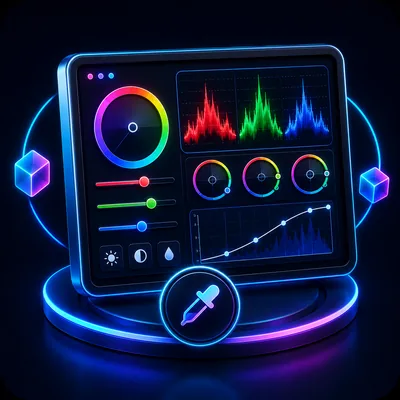
Advanced Color Management
Professional color and brightness tools with RGB parade, right from a tablet.
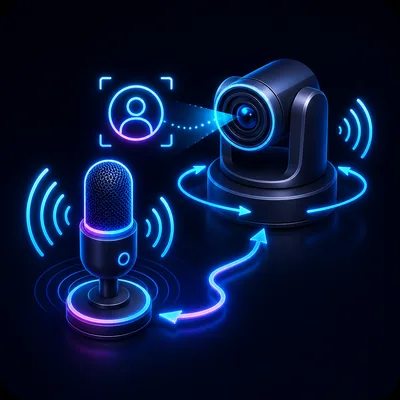
Voice Tracking
Pre-integrated with major microphone vendors for plug-and-play voice-activated camera control.

Continuous Updates
New features, integrations, and AI capabilities delivered over time. Your investment grows.
“Horizon ensures your PTZOptics cameras get smarter over time… protecting and growing your investment.”
— Matt Davis, Chief Technology Officer, PTZOptics
Fingertip Filmmaker Control
Point, Click & Drag
Horizon's camera control interface improves on joystick control by allowing you to point and click or click and drag over your scene to change camera positions.
Speed Templates
Easily set and change pan, tilt and zoom and focus speeds with one click through our new speed templates.
Pro Color Correction
Advanced color correction is made easy with color setting transfer, before-and-after views, a dropper tool, RGB parade, vectorscope and waveform monitors.
Set Your Shots
Visual Presets
Cover all your angles with visual presets, then move smoothly back and forth between them, giving your production a dynamic, professional feel.
Auto Pictures & Names
Automatically set pictures and add names to correspond with your shot presets.
Preset Groups
Customize groups of shot presets to account for different events, stagings, lighting setups or times of day.
Updated PTZ Camera Operator Features
Auto-Tracking
Advanced subject tracking built in
Video Templates
Pre-configured settings for common scenarios
White Balance Modes
Multiple WB presets and manual control
Exposure Modes
Flexible exposure control for any lighting
On-Camera Firmware Updates
Update directly from the interface
Horizon Hub
Horizon Hub is the desktop gateway to the Horizon Software Suite. It lets users download, install, and update three applications from one place:
Desktop Control
Intuitive PTZ camera control from your desktop.
- Virtual 8-direction D-pad for precise pan and tilt
- Mouse-based controls: point/drag and framing
- Shots: create and update presets with thumbnails and labels
- Speed controls and automation (auto-tracking / auto-framing)
Device Manager
Discover and manage all PTZOptics devices on your network.
- Monitor firmware versions across your entire fleet
- Update PTZOptics equipment at once
- Get a quick live view of every device on your network
- Scalable from single-room installs to multi-camera environments
Voice Tracking
Recall presets or switch sources based on the active speaker via hardware or software.
- Available as a desktop application, not just on Move 4K / Link 4K
- Follows who’s talking, not who’s moving — ideal for meeting rooms and classrooms
- Works with 10 microphone systems and leading switchers.
Voice Tracking Compatibility
Works with leading switchers and microphone systems.
Supported switchers
- OBS
- vMix
- Inogeni CAM230
- Inogeni IP2USB
- Epiphan
Supported microphones
- Audio-Technica
- ATND1061D
- Nureva
- HDL410
- Shure
- MXA920
- Sennheiser
- TeamConnect Ceiling 2
- TeamConnect Ceiling Medium
- SpeechLine Digital Wireless
- Televic
- Confero Systems
- Flex
- D-Cerno
- Yamaha
- RM-CG
Rise Premium
Model: PT20X-RISE-4K-BK • $8,999 MAP.
PTZOptics' first entry into the premium-tier PTZ category. Built to compete with Sony, Panasonic, and Canon flagships. Fuses high-performance hardware with the PTZOptics software ecosystem.
Specs That Matter
1" 50MP Sensor
Larger sensor for improved light capture and detail. Higher resolution means better scaling and clarity.
4K at 60fps
Smooth motion for live production. Broadcast-ready video pipeline.
20X Optical Zoom
~71° horizontal field of view. Wide for room coverage, strong zoom for long-distance capture. Large venues and studios.
PDAF + OIS
Phase Detect Autofocus — fast, accurate subject acquisition. Optical Image Stabilization reduces micro-jitter in live environments.
AI Auto Tracking
More reliable subject tracking for presenters, speakers, live events. Reduced operator dependency.
Brushless DC Motors
High-precision positioning, ultra-smooth pan/tilt, cinematic motion even at extremely low speeds.
Broadcast Integration
Connectivity
12G-SDI (4K60 workflows), 3G-SDI, HDMI 2.0, USB 3.0 Type-C (UVC). IP streaming: NDI HX3 (included), SRT, RTMP, RTSP, H.265. SFP+ Fiber (12G, built-in).
Broadcast Features
Timecode & Genlock for multi-camera sync. FreeD protocol for virtual production. XLR audio with 48V phantom power. Built-in 3-stage ND filter (1/4, 1/16, 1/64).
Onboard
Local recording (TF card) with onboard storage. Front and rear tally lights with multi-status indication.
NDAA Compliant
Critical for government, enterprise, and education markets. Most competitors in this tier are NOT NDAA compliant. This is a key differentiator.
DO — What to Say
"Our first premium-tier PTZ."
Frame it as an exciting expansion into a new market tier.
"1-inch sensor, 4K60, 12G-SDI, Genlock — broadcast-grade."
Lead with the specs that broadcast professionals care about.
"NDAA compliant — unlike others at this level."
This is the competitive wedge. Use it, especially with government and enterprise.
"Combined with Horizon, your investment gets smarter over time."
Connect hardware excellence with the software story.
DON'T — What NOT to Say
Don't discount the $8,999 MAP
Pricing is set at $8,999 MAP. Don't discount it. Don't say "starting at" — it's one model, one price. Lead with total cost of ownership vs competitors who charge extra for tracking licenses and SFP+ modules.
Don't quote beyond the confirmed specs
Use the confirmed spec sheet on this page. If asked about anything not listed, say “let me confirm that with PTZOptics.”
Don't volunteer NDI HX3 unprompted
NDI HX3 is included and confirmed. But don't lead with it — lead with the total package. If asked about NDI, confirm HX3 is included at no extra cost.
Never frame as a "product launch"
It's available now — not a pre-order.
Deflection Scripts
You will get these questions. Here's exactly how to handle them.
Rise 4K vs Broadcast Tier — Full Spec Comparison
| Spec | PTZOptics Rise 4K PT20X-RISE-4K-BK | Panasonic AW-UE160 | Panasonic AW-UE150A | Sony BRC-AM7 | Sony BRC-X1000/WPW | Canon CR-N700 | AVer TR615 |
|---|---|---|---|---|---|---|---|
| Optical Zoom | 20x | 20x | 20x | 20x | 12x | 15x | 19x |
| Resolution | 4K60 | 4K60 | 4K60 | 4K60 | 4K30 | 4K60 | 4K60 |
| Image Sensor | 1" CMOS (50MP) | 1" MOS (9.62MP) | 1" MOS (20.18MP) | 1" Exmor RS (14MP) | 1" Exmor R (14.2MP) | 1" CMOS (8.29MP) | 1" Exmor RS (17.25MP) |
| Lens Aperture | F2.8 - F4.5 | F2.8 - F4.5 | F2.8 - F4.5 | F2.8 - F4.5 | F2.8 - F4.5 | F2.8 - F4.5 | F2.8 - F4.5 |
| ND Filter | Yes (1/4, 1/16, 1/64) | Yes (1/4, 1/16, 1/64) | Yes (1/4, 1/16, 1/64) | Yes (variable 1/4 - 1/128) | Yes (1/4, 1/16, 1/64) | Yes (1/4, 1/16, 1/64) | — |
| Image Stabilization | Yes (OIS) | Yes (OIS + Hybrid) | Yes (OIS) | Yes (OIS) | No | Yes (OIS) | — |
| Auto Tracking | Yes (AI ReID/FaceID, included) | Paid license (AW-SF100/SF200) | Paid license (AW-SF100/SF200) | Yes (built-in) | No | Lite free / full requires paid RA-AT001 | Yes (built-in) |
| 12G-SDI | Yes | Yes | Yes | Yes | No | Yes | Yes (2x) |
| 3G-SDI | Yes (dedicated) | Yes (2x) | Yes (2x) | Yes (monitor out) | Yes (4x) | Yes | HD via 12G BNC |
| HDMI | Yes (2.0) | Yes (2.0) | Yes (2.0) | Yes | Yes | Yes | Yes |
| USB | Yes (USB 3.0 Type-C, UVC) | No (host port only) | No | No | No | No | Yes (USB 3.2 Type-B) |
| NDI | NDI HX3 (included) | NDI HB + HX2 | NDI HB + HX2 | NDI HX2 only | No NDI | NDI HX2 only | NDI HX3 (included) |
| IP Streaming | SRT / RTMP(S) / RTSP / H.265 | SRT / RTMP(S) / RTSP / H.265 | SRT / RTMP(S) / RTSP / H.265 | SRT / RTMP(S) / RTSP / H.265 | None (VISCA IP control only) | SRT / RTMP(S) / RTSP / H.265 | SRT / RTMP / RTSP / H.265 |
| SFP+ Fiber | Yes (12G, built-in) | Yes (module sold separately) | Yes (module sold separately) | Yes | No | No | No |
| Genlock | Yes | Yes | Yes | Yes | Yes | Yes | Yes |
| Timecode In | Yes | No | No | Yes | No | Yes (In + Out) | No |
| XLR Audio In (48V) | Yes (2x, 48V phantom) | Yes (2x, 47V) | No | Yes (2x, 48V) | No audio inputs | Yes (2x, 48V) | Yes (2x, 47V) |
| Audio In 3.5mm | Yes (In + Out) | No | Yes | Yes | No | Yes | Yes |
| Tally | Yes (3x bi-color, front & rear) | Yes (front & rear) | Yes | Yes (4-color) | Yes (front & rear) | Yes | Yes |
| PoE | Yes (PoE++ 802.3bt) | Yes (PoE++ 802.3bt) | Yes (PoE++ 802.3bt) | Yes (PoE++ 802.3bt) | PoE+ (802.3at) | Yes (PoE++ 802.3bt) | Yes (PoE++ 802.3bt) |
| Warranty | 5 Year | Limited 1 year | Limited 1 year | Limited 1 year | Limited 1 year | 3 Year | 5 Year |
| MAP | $8,999 MAP | ~$12,473 | ~$9,962 | ~$13,900 | $10,300 | $7,999 MAP | ~$8,013 |
Key Takeaways
- Rise 4K is the only camera in this group that pairs a 1-inch 4K60 sensor with 12G-SDI, genlock, timecode, built-in SFP+ fiber, dual 48V XLR inputs AND fully-included AI auto-tracking — at $8,999 MAP.
- Panasonic (AW-SF100/SF200) and Canon (RA-AT001) both gate real auto-tracking behind a paid software license, and neither Panasonic body includes the SFP+ module.
- Sony BRC-X1000/WPW is a 2017-era 4K30 platform: no NDI, no IP streaming, no audio inputs, no auto-tracking — and it still lists at $10,300.
- Sony BRC-AM7 matches Rise 4K on I/O but runs roughly $13,900 street and is NDI HX2 only (no High Bandwidth).
- AVer TR615 is the closest functional match and the only competitor here with published NDAA + TAA compliance, but it has no SFP+, no timecode, no dedicated 3G-SDI, and AVer publishes no ND filter or stabilization spec at all.
Detail Close-Ups
MiniJoy
Model: PT-MINIJOY-G1 • $849 MAP.
The size is the surprise, not the value proposition. MiniJoy is a powerful, intelligent PTZ controller built for modern production workflows. Automatically discover cameras across the network, preview NDI and RTSP feeds, control cameras over IP or serial, and customize commands, presets and camera functions from one remarkably compact device.
Top Highlights
3” Integrated Display
Preview NDI and RTSP camera feeds while viewing camera settings and control information directly on the controller.
4K30 HDMI Output
Send the selected camera feed to a connected confidence monitor for a larger, high-quality preview.
Intelligent, Customizable Control
Find cameras on your network and access presets, camera functions and custom commands through four assignable controls across six pages.
Intelligent Camera Discovery
Camera discovery is not a setup utility hidden on another computer. It is part of the control surface.
01 • Press SEARCH
MiniJoy scans the local network for compatible cameras.
02 • Review the List
See discovered cameras and choose to Edit, Add or Ignore.
03 • Open CAM LIST
Approved cameras are ready to recall and control from the controller.
Built for Modern Production
Integrated Monitoring
Preview NDI and RTSP feeds on the 3-inch display. Keep eyes on the selected camera while viewing essential control information directly on MiniJoy.
External Confidence Monitor
4K30 HDMI output. Send the selected camera feed to a connected display when you want a bigger preview.
Camera Scale
Built to manage up to 1,000 cameras. A compact controller does not mean a compact camera list.
Tactile Control + Presets
A 4D precision joystick — pan, tilt, zoom, twist, including simultaneous movement across axes. Store and recall 255 presets per camera from the keypad and SET/CALL controls.
Flexible Control Architecture
Network-first. Serial-ready. Designed to sit comfortably in mixed production environments.
Detail Close-Ups
Technical Snapshot
| Display | 3-inch integrated color display |
| Video preview | NDI and RTSP camera feed preview |
| HDMI output | Up to 4K30 for an external confidence monitor |
| Camera discovery | On-device network camera search with SEARCH and CAM LIST workflow |
| Camera capacity | Support for up to 1,000 cameras |
| IP control | ONVIF, VISCA over IP, VISCA TCP and NDI |
| Serial control | VISCA and Pelco D/P |
| Joystick | 4D precision joystick — pan, tilt, zoom, twist |
| Custom controls | 4 push-button rotary knobs × 6 customizable pages |
| Custom control capacity | 24 assignable control slots + PTZOptics command library |
| Maximum presets | 255 per camera |
| Serial connection | RS-422 / RS-485 Phoenix connector |
| HDMI | HDMI 2.0 output, up to 4K30 |
| Power | 12V DC, 0.25A or 802.3af PoE — 3W rated |
| Web interface | Browser-based management and customization |
| Dimensions | 8.27 × 5.43 × 3.98 in (210 × 138 × 101 mm), joystick included |
| Weight | 1.76 lb (0.8 kg) |
| Environment | Indoor only |
| Model | PT-MINIJOY-G1 |
| Pricing | $849 MAP |
| Availability | Available |
DO — What to Say
“Discovery, preview and control in one compact device.”
Lead with the workflow: find cameras, preview feeds, take control — all from the controller itself.
“$849 MAP — professional control without the full-size footprint.”
Position against SuperJoy ($1,299) as the compact companion for portable and space-constrained workflows.
“24 assignable slots across six pages.”
Customization depth is the differentiator vs basic compact joysticks.
“Up to 1,000 cameras.”
Compact does not mean limited. Great for large managed deployments.
DON’T — What NOT to Say
Don’t position as a SuperJoy replacement
MiniJoy is a companion product. SuperJoy remains the full-size controller for multi-camera rooms. MiniJoy is for compact, portable and secondary workflows.
Don’t sell it on size alone
The size is the surprise, not the value proposition. Lead with discovery, preview and customization.
Don’t lead with discounts
Pricing is set at $849 MAP. Lead with value (display + discovery + customization) not price.
Don’t oversell unconfirmed specs
Only quote the confirmed snapshot above. If asked about unlisted specs, say “let me confirm that with PTZOptics.”
SuperJoy
Model: PT-SUPERJOY-G1 • $1,299.
The multi-brand control solution. SuperJoy controls over 250 camera models across brands — Sony, BirdDog, Lumens, Marshall, Panasonic, AVer, and more — alongside your PTZOptics cameras from one joystick. Do not replace your existing fleet. Control it.
Top Highlights
250+ Camera Models
Cross-brand control of Sony, BirdDog, Lumens, Marshall, Panasonic, AVer, PTZOptics and more. If cameras support VISCA, NDI, ONVIF, or Pelco, SuperJoy can likely control them.
One-Button ATEM Sync
Press a preset button and the camera moves while the Blackmagic ATEM cuts to that camera — simultaneously. The worship and corporate one-button workflow.
Customizable M-CORE Buttons
Assignable buttons for presets, macros, and camera functions — including a custom button for auto-tracking. Put your most-used actions where your hands are.
Cross-Brand Control
One controller for mixed-brand fleets. No need to replace existing cameras.
Compatible brands include: Sony, BirdDog, Lumens, Marshall, Panasonic, AVer, PTZOptics, and more — 250+ camera models total.
The One-Button Workflow
The standard worship and corporate workflow. A volunteer presses one button. That is the entire operation.
Button 1 → Pastor
Camera moves to preset. ATEM cuts to that camera.
Button 2 → Worship Team
One press. New camera position. New program feed.
Button 3 → Choir
One press. Done. No joystick skills required.
Hundreds of churches and corporate production rooms run this exact workflow with non-technical volunteer operators.
Technical Snapshot
| Model | PT-SUPERJOY-G1 |
| MAP | $1,299 |
| Maximum cameras | 253 channels / cameras |
| Camera groups | Groups 1–4: 7 cameras each • Group 5: 225 cameras |
| Operator modes | Basic, Basic Plus, Matrix |
| PTZ presets | Up to 255 presets • 9 quick presets • 4 Super Presets |
| Super Presets | Synchronize preset commands across up to 4 camera groups × 7 cameras |
| Video preview | Built-in decoder with HDMI display output, up to 1080p |
| Network | 10/100M Ethernet / RJ-45 with 802.3af PoE |
| Serial connections | RS-232 plus RS-422 / RS-485 |
| Core protocols | VISCA, VISCA over IP, Pelco D, Pelco P |
| Additional support | Limited Sony VISCA, ONVIF, NDI, Panasonic HTTP • WebSockets |
| Custom buttons + triggers | Program custom buttons and trigger commands for cameras, lighting, screens and other network devices (HTTP / UART / TCP / UDP) |
| Power | 6W • 12V DC or 802.3af PoE |
| Recommended distances | Ethernet 328 ft / 100 m • RS-232 50 ft / 15 m • RS-485 3,937 ft / 1,200 m |
| Baud rate | 1200–19200 bps |
| Housing | Black metal chassis with rubberized controls |
| Warranty | 2 years |
SuperJoy vs MiniJoy
| Feature | SuperJoy | MiniJoy |
|---|---|---|
| Position | Full-size multi-camera rooms | Compact and portable workflows |
| Price | $1,299 | $849 MAP |
| Display | Large LCD with controller status | 3” integrated color display |
| Video preview | Built-in decoder, HDMI out | NDI + RTSP on-device preview |
| HDMI output | Up to 1080p | Up to 4K30 |
| Camera capacity | 253 cameras across 5 groups | Up to 1,000 cameras |
| Super Presets | 4 Super Presets (4 groups × 7 cameras) | — |
| Custom controls | Custom buttons + auto triggers (HTTP / UART / TCP / UDP) | 4 rotary controls × 6 pages = 24 slots |
| ATEM sync | Yes — one-button workflow | Confirm with PTZOptics |
| Operator modes | Basic / Basic Plus / Matrix | — |
| Power | 12V DC or PoE (6W) | 12V DC or PoE (3W) |
Positioning: companions, not competitors. SuperJoy for full-size rooms and ATEM workflows. MiniJoy for compact desks, portability, and monitoring-first control.
DO — What to Say
“Keep your existing cameras.”
The strongest pitch for mixed-brand fleets: 250+ models, no rip-and-replace. One joystick controls everything.
“One button per shot.”
Demo the ATEM sync — press a button, camera moves, switcher cuts. Volunteers can run it.
“Often less than brand-specific controllers.”
$1,299 vs brand-specific controllers — with cross-brand flexibility they cannot offer.
“Pair with MiniJoy for compact rooms.”
Sell the family: SuperJoy in the main room, MiniJoy in compact and portable setups.
DON’T — What NOT to Say
Don’t claim it controls everything
Verify specific models. Be precise about protocols: VISCA, NDI, ONVIF, Pelco. Proprietary-protocol cameras may not work.
Don’t promise ATEM integration it doesn’t have
ATEM sync works with Blackmagic ATEM switchers. Verify the customer’s switcher model before promising the workflow.
Don’t say it replaces a switcher
SuperJoy triggers ATEM cuts — it is not a switcher. It controls cameras and syncs with the ATEM.
Don’t undercut the $1,299 MAP
Pricing is set. Sell the total value: cross-brand control + ATEM sync + custom buttons.
Move 4K Flagship
Models: Move 4K 12X / 20X / 30X • From $1,999.
The flagship 4K PTZ camera for production rooms that need everything in one camera: 4K60, built-in auto-tracking at no extra cost, NDI HX3, SDI, HDMI, USB, and IP outputs — with Horizon software that keeps getting smarter via firmware updates.
Top Highlights
4K60 + NDI HX3
Broadcast-quality 4K60 over SDI, HDMI, USB, and IP — with efficient NDI HX3 built in for networked workflows.
Built-In Auto-Tracking
Included at no extra cost — competitors charge $800+ for a tracking license. Presenter Lock, Group Lock, Stage Lock modes.
SuperZoom
Output 1080p and the 4K sensor crops in, doubling optical zoom with no quality loss: 12X→24X, 20X→40X, 30X→60X.
Model Lineup
| Model | Zoom / FOV | Best For | Colors | MAP |
|---|---|---|---|---|
| Move 4K 12X | 12X • 72.5° HFOV | Up to 25 ft | White / Gray | $1,999 |
| Move 4K 20X | 20X • 60.7° HFOV | 25–45 ft | White / Gray / Red | $2,349 |
| Move 4K 30X | 30X • 59.2° HFOV | 45 ft+ | White / Gray | $2,699 |
Technical Snapshot
| Resolution | 4K60 |
| Sensor | 1/1.8” Sony CMOS, 8.42MP |
| Zoom options | 12X, 20X, 30X optical + SuperZoom (2X in 1080p) |
| Auto-tracking | Built-in, no paid license — Presenter, Group, Stage Lock |
| Outputs | SDI, HDMI, USB, IP |
| NDI | NDI HX3 built in |
| Software | Horizon web interface — continuous firmware updates |
| Power | PoE+ or universal PSU |
| Warranty | 5 years |
| NDAA | Compliant (Section 889) |
DO — What to Say
“Tracking is included.”
The wedge vs competitors charging $800+ for tracking licenses. Move 4K has it built in.
“One camera, every output.”
SDI, HDMI, USB, and IP in a single camera — no adapters, no add-ons.
“Your camera gets smarter over time.”
Horizon delivers new features via firmware — the investment grows.
“Match the zoom to the room.”
Use the Zoom Guide to pick 12X/20X/30X by subject distance — never oversell zoom.
DON’T — What NOT to Say
Don’t sell 4K as always better
If the room only does Zoom/Teams calls at 1080p, Move SE saves the customer $800. Fit the camera to the room.
Don’t promise broadcast features
Move 4K is ProAV tier. For 12G-SDI, genlock, timecode — that’s Rise 4K, not Move 4K.
Don’t claim NDI High Bandwidth
Move 4K is NDI HX3 — efficient, lower bandwidth. Do not claim Full/HB NDI.
Don’t discount below MAP
Pricing is set: $1,999 / $2,349 / $2,699. Sell total value, not discounts.
Move SE Entry Professional
Models: Move SE 12X / 20X / 30X • From $1,199.
The value play: 1080p60 with built-in auto-tracking and NDI HX3 at an entry price. For rooms that do not need 4K — meeting rooms, classrooms, worship — Move SE delivers the core PTZOptics feature set for $800 less than Move 4K.
Top Highlights
Built-In Auto-Tracking
The same tracking included at no extra cost — not a stripped-down version. Presenter Lock included.
NDI HX3
Networked video built in — the same NDI as the flagship at the entry price.
From $1,199
The most affordable way into the PTZOptics ecosystem with tracking and NDI included.
Model Lineup
| Model | Zoom / FOV | Colors | MAP |
|---|---|---|---|
| Move SE 12X | 12X • 72.5° HFOV | White / Gray | $1,199 |
| Move SE 20X | 20X • 60.7° HFOV | White / Gray | $1,349 |
| Move SE 30X | 30X • 60.7° HFOV | White / Gray | $1,499 |
Technical Snapshot
| Resolution | 1080p60 |
| Zoom options | 12X, 20X, 30X optical |
| Auto-tracking | Built-in, no paid license |
| Outputs | SDI, HDMI, USB, IP |
| NDI | NDI HX3 |
| Software | Horizon web interface |
| Power | PoE or universal PSU |
| Warranty | 5 years |
| NDAA | Compliant (Section 889) |
Move 4K vs Move SE
| Feature | Move 4K | Move SE |
|---|---|---|
| Resolution | 4K60 | 1080p60 |
| SuperZoom | Yes (2X in 1080p) | No |
| Auto-tracking | Included | Included |
| NDI | HX3 | HX3 |
| Outputs | SDI, HDMI, USB, IP | SDI, HDMI, USB, IP |
| Starting MAP | $1,999 | $1,199 |
Sell the right camera for the room: Move SE for 1080p workflows, Move 4K when 4K60 or SuperZoom matter.
DO — What to Say
“Tracking and NDI included at $1,199.”
At this price, competitors charge extra for tracking or skip NDI entirely. Move SE includes both.
“The smart choice for 1080p rooms.”
Zoom/Teams calls, lecture capture, worship — if the output is 1080p, Move SE is the right camera and saves $800.
“Same ecosystem as the flagship.”
Horizon, Hive, SuperJoy control, 5-year warranty — full ecosystem membership at entry price.
“Bundle with SuperJoy.”
SE Producer + JOY4 bundle bundles the camera with a controller for simple rooms.
DON’T — What NOT to Say
Don’t claim 4K
Move SE is 1080p60. If the customer needs 4K60, that’s Move 4K — say so honestly.
Don’t position as inferior
Move SE is the fit-for-purpose choice, not the cheap one. Framing matters.
Don’t oversell zoom reach
30X on Move SE shares the 60.7° HFOV — match zoom to room with the Zoom Guide.
Don’t discount below MAP
$1,199 / $1,349 / $1,499. Sell ecosystem value, not price cuts.
Detail Close-Ups
Link 4K
Models: Link 4K 12X / 20X / 30X • From $1,999.
The Dante AV-H camera for audio-first production environments. Link 4K pairs the Move 4K feature set (4K60, tracking, NDI HX3) with Dante AV-H and 3.5mm audio in/out — built for Dante workflows and IP-based audio production.
Top Highlights
Dante AV-H
Native Dante AV-H support — video and audio on the Dante network. The camera for Dante-first environments.
4K60 + NDI HX3
Full Move 4K-tier video: 4K60 over SDI, HDMI, USB, IP with NDI HX3 built in.
3.5mm Audio In/Out
Analog audio in and out alongside Dante — bridges legacy audio into the Dante network.
Model Lineup
| Model | Zoom / FOV | Colors | MAP |
|---|---|---|---|
| Link 4K 12X | 12X • 72.5° HFOV | White / Gray | $1,999 |
| Link 4K 20X | 20X • 60.7° HFOV | White / Gray | $2,349 |
| Link 4K 30X | 30X • 59.2° HFOV | White / Gray | $2,699 |
Technical Snapshot
| Resolution | 4K60 |
| Zoom options | 12X, 20X, 30X optical + SuperZoom (2X in 1080p) |
| Auto-tracking | Built-in, no paid license |
| Outputs | SDI, HDMI, USB, IP, Dante AV-H |
| Audio | 3.5mm audio in/out + Dante AV-H audio |
| NDI | NDI HX3 |
| Power | PoE+ or universal PSU |
| Warranty | 5 years |
| NDAA | Compliant (Section 889) |
DO — What to Say
“The Dante-native choice.”
When the facility runs Dante, Link 4K belongs in the conversation — video and audio on one network.
“Move 4K feature set plus Dante.”
Same price as Move 4K — the differentiator is Dante AV-H and analog audio I/O.
“Bridge legacy audio into Dante.”
3.5mm in/out plus Dante AV-H — analog sources can ride the Dante network.
“Encoder/decoder built in.”
Link 4K is an encoder and decoder — Dante AV-H workflows without extra boxes.
DON’T — What NOT to Say
Don’t oversell to non-Dante rooms
If the facility does not run Dante, Move 4K is the better fit at the same price. Fit the camera to the infrastructure.
Don’t claim Dante audio-only workflows
Link 4K is Dante AV-H (audio + video) — verify the customer’s Dante infrastructure supports AV-H video.
Don’t confuse with Studio line
Link 4K is a full PTZ. Studio cameras are fixed — different products, different jobs.
Don’t discount below MAP
$1,999 / $2,349 / $2,699 — same as Move 4K. The differentiator is fit, not price.
Studio 4K
Models: Studio 4K 12X / 20X • From $1,199.
The compact fixed camera for positions that never need to move. Studio 4K delivers 4K60, SuperZoom, and NDI HX3 in a small fixed form factor — perfect for fixed shots, studios, classrooms, and Hive-linked deployments where the shot never changes.
Top Highlights
4K60 + NDI HX3
Full 4K60 with NDI HX3 in a compact fixed body.
SuperZoom
12X→24X and 20X→40X in 1080p — double the optical reach with no quality loss.
Hive-Linked
Compact and remote-manageable — built for multi-camera Hive Studio deployments.
Model Lineup
| Model | Zoom | MAP |
|---|---|---|
| Studio 4K 12X | 12X (24X with SuperZoom) | $1,199 |
| Studio 4K 20X | 20X (40X with SuperZoom) | $1,349 |
Technical Snapshot
| Resolution | 4K60 |
| Form factor | Fixed — no pan/tilt, no auto-tracking |
| Finishes | White / Gray |
| Zoom options | 12X, 20X optical + SuperZoom (2X in 1080p) |
| Outputs | 3G-SDI, HDMI, USB, IP |
| NDI | NDI HX3 |
| Warranty | 5 years |
| NDAA | Compliant (Section 889) |
DO — What to Say
“Fixed shots, fixed budget.”
When the shot never moves, Studio 4K saves money vs a PTZ. Match the mechanism to the need.
“SuperZoom doubles the reach.”
12X→24X, 20X→40X in 1080p — zoom without paying for 30X optics.
“Perfect for Hive fleets.”
Compact, Hive-linked fixed cameras scale multi-room deployments at lower cost per position.
“Studio SE for tighter budgets.”
1080p version from $949 when 4K is not needed.
DON’T — What NOT to Say
Don’t sell as a PTZ
Fixed camera — no pan/tilt, no auto-tracking. If the room needs movement, sell Move.
Don’t claim tracking
No auto-tracking on the Studio line — that’s Move and SimplTrack3.
Don’t oversell remote control
No remote pan/tilt to control — presets and settings only via network.
Don’t discount below MAP
$1,199 / $1,349. Sell fit-for-purpose value.
Studio SE Most Affordable
Models: Studio SE 12X / 20X • From $949.
The entry point to the PTZOptics ecosystem: 1080p60 with SDI, HDMI, USB, IP outputs, a built-in mic, and tally — the most affordable camera PTZOptics makes. For fixed positions where 4K and tracking are not needed.
Top Highlights
From $949
The most affordable PTZOptics camera — SDI included at a price competitors charge for HDMI-only.
Built-In Mic + Tally
Integrated microphone and tally light — ready for simple rooms out of the box.
Every Output
SDI, HDMI, USB, and IP — the full output set even at the entry price.
Model Lineup
| Model | Zoom | MAP |
|---|---|---|
| Studio SE 12X | 12X | $949 |
| Studio SE 20X | 20X | $1,199 |
Technical Snapshot
| Resolution | 1080p60 |
| Form factor | Fixed — no pan/tilt, no auto-tracking |
| Finishes | White / Gray |
| Outputs | SDI, HDMI, USB, IP |
| Audio | Built-in microphone |
| Tally | Built-in tally light |
| Warranty | 5 years |
When to Sell Studio SE vs Move SE
| Feature | Move SE | Studio SE |
|---|---|---|
| Movement | Pan/tilt PTZ | Fixed |
| Auto-tracking | Included | No |
| Resolution | 1080p60 | 1080p60 |
| Outputs | SDI, HDMI, USB, IP | SDI, HDMI, USB, IP |
| Starting MAP | $1,199 | $949 |
Sell Studio SE for fixed positions at the lowest cost. Sell Move SE when the shot needs to move or track.
DO — What to Say
“SDI at $949.”
Competitors at this price often skip SDI. Studio SE includes the full output set.
“The fleet camera.”
Fill large deployments with fixed positions at the lowest cost per camera — then add Move cameras where motion matters.
“Mic and tally built in.”
Simple rooms work out of the box — no extra peripherals needed.
“Upgrade path is smooth.”
Same ecosystem: Horizon, Hive, SuperJoy. Start with Studio SE, scale to Move 4K without changing infrastructure.
DON’T — What NOT to Say
Don’t sell as a PTZ
Fixed camera — no pan/tilt. If the room needs movement, that’s Move SE for $250 more.
Don’t claim tracking or 4K
No auto-tracking, no 4K — 1080p60 fixed. Honest framing wins the upsell later.
Don’t position as the default
Studio SE is for fixed positions. Default new-room conversations to Move unless the position is truly fixed.
Don’t discount below MAP
$949 / $1,199. It is already the most affordable camera in the line.
SimplTrack3 Auto-Tracking
Model: HC20X-SIMPLTRACK3 • $1,999.
The dedicated auto-tracking camera for lecture capture and autonomous observation. SimplTrack3 pairs a wide reference lens (sees the whole room) with a 20X tracking lens (follows the presenter) — set it up once, configure tracking zones, and it runs autonomously. Faculty never touch a controller.
Top Highlights
Dual-Lens Design
Wide reference lens monitors the full room while the 20X tracking lens follows the presenter — no blind spots when people cross.
Zero Operator Dependency
Set up once, then it tracks autonomously. Built for lecture capture where faculty never touch a controller.
Zone Management
Configure tracking zones that confine tracking to the teaching area — the camera ignores the aisles and whiteboard edges.
Model
| Model | Description | Color | MAP |
|---|---|---|---|
| SimplTrack3 (HC20X-SIMPLTRACK3) | Third-gen dual-lens auto-tracking PTZ | Gray | $1,999 |
Technical Snapshot
| Design | Dual-lens: wide reference + 20X tracking lens |
| Tracking | Auto-tracking and auto-framing with zone management, Presenter Lock |
| Outputs | IP, 3G-SDI, HDMI, USB 3.0 |
| NDI | NDI HX2 (not HX3) |
| Warranty | 5 years |
| NDAA | Compliant (Section 889) |
The Faculty Adoption Answer
The number one education objection is “faculty will not use it.” SimplTrack3 is the answer:
Zero Faculty Operation
They walk in, teach normally, and the camera follows. No buttons, no training, no controller.
Presenter Lock
Stays on the instructor even when students walk in front of the camera.
Zones Confine Tracking
Configure the tracking zone to the teaching area — the camera ignores everything else.
Also used in clinical education, simulation labs, and procedure documentation — positioned outside the sterile field with local SDI/HDMI output (no cloud required).
DO — What to Say
“Faculty never touch it.”
The core education pitch: set up once, runs autonomously, zero interaction.
“Dual lenses see the whole room.”
The reference lens watches the room while the tracking lens follows the presenter — solves the crossing-people problem.
“Zones keep tracking where it belongs.”
Configure zones to the teaching area — no tracking the front row or doorways.
“Clinical-safe design.”
Local SDI/HDMI output, closed-network IP control — works in simulation and training environments without cloud dependency.
DON’T — What NOT to Say
Don’t claim NDI HX3
SimplTrack3 is NDI HX2. If the customer needs HX3, that’s Move 4K or Move SE.
Don’t sell it as a general PTZ
Fixed dual-lens design — it is purpose-built for tracking, not flexible framing. Manual moves are not the workflow.
Don’t claim HIPAA compliance
The camera is a video capture layer — compliance is the complete system. Be honest with clinical compliance teams.
Don’t discount below MAP
$1,999. Sell the zero-operator value, not the price.
Power+Link
A compact wireless power and connectivity solution for compatible IP camera workflows.
Designed to simplify deployment in sports, live production, and other hard-to-wire environments, Power+Link combines wireless networking, built-in PoE+ support, flexible power options, and an integrated V-mount battery design in one rugged, mountable device.
What It Does
Wireless Camera Freedom
Turn a compatible IP-based camera into a more flexible production tool. Power+Link enables wireless video and control over virtually any wireless router or network.
Built-In PoE+
Delivers power and data through a single cable, helping reduce rig clutter and simplify setup.
Flexible Power Options
Supports DC input, PoE, or V-mount battery power depending on the workflow.
Integrated V-Mount Design
Built-in V-mount plate creates a cleaner battery-powered setup with more robust power and longer run time for mobile or temporary installs.
Mountable, Production-Ready Build
Wall-, ceiling-, or tripod-mountable with 1/4"-20 mounting inserts on both sides and keyhole hangers on the back.
Rugged Construction
Hardened aluminum housing built for professional environments.
Specs That Matter
Wireless Connectivity
Supports dual-band wireless (2.4GHz / 5GHz), up to Wi-Fi 6.
Up to 80 Mbps
Designed to support flexible IP-based camera workflows with transmission rates up to 80 Mbps.
PoE+ Support
Built-in support up to IEEE 802.3at for simplified power and data delivery.
V-Mount Battery Compatible
Integrated battery plate supports more robust power with longer run time for untethered setups.
Hardened Aluminum Body
Compact, durable construction for installed or mobile production use.
Flexible Mounting
Standard 1/4"-20 mounting points plus keyhole hangers for secure installation.
Connectivity + Build
Connections
RJ45 port, DC power input, V-mount battery slot
Indicators
Power, PoE+, and battery status
Power Options
DC, PoE, or V-mount battery
Wireless
4 x 3dBi dual-band omni-directional antennas
In the Box
- Power Adapter & Cable
- Power+Link
DO — What to Say
"This gives compatible IP camera workflows more deployment flexibility."
Keep the story centered on flexibility, cleaner setup, and easier camera placement.
"Wireless, PoE+, and V-mount support in one device."
Lead with the combination of connectivity and power options.
"It's designed for sports, live production, and hard-to-wire environments."
Anchor the use case quickly.
"The integrated V-mount plate helps create a cleaner mobile setup."
Useful when people ask why the battery pairing matters.
DON'T — What NOT to Say
Don't oversell it as replacing every wired workflow
Position it as a flexible option for setups where cabling is difficult, temporary, or undesirable.
Don't speculate on final release details
No launch timing, no pricing, no promises beyond the approved talking points.
Deflection Scripts
You will get these questions. Here's exactly how to handle them.
PTZOptics is HETMA-Approved
Higher Education • Lecture Capture • Classroom Production • Campus-Wide Deployments
PTZOptics has consistently tailored its products to meet the specialized requirements of the higher education sector with future-friendly connectivity, intelligent auto-tracking capability, affordability, compatibility with a wide range of control platforms, and long-term performance.
One key reason PTZOptics stands out is its alignment with the Higher Education Technology Managers Alliance (HETMA). The HETMA Approval Committee focuses on ensuring that AV technology in education is robust, easy to manage, and reliable over time, and PTZOptics excels in these areas.
How PTZOptics Meets HETMA Standards
Reliability
PTZOptics cameras can run continuously for weeks powered by PoE without any issues. Crucial for institutions requiring long-term, uninterrupted operation.
“We left it powered on (PoE) for several weeks and also used it for a couple of special events before installing it.” — HETMA Approved Program Chair
Seamless Integration
Designed to integrate effortlessly with popular control systems used in educational institutions, such as Crestron and Q-SYS.
“Controlled it with both Q-SYS and Crestron controllers.” — HETMA Committee Member
Affordability without Compromise
High-quality performance at a competitive price point, making them accessible to institutions with varying budgets.
“We've tested tracking cameras that cost 2-3x as much as this one and don't track/perform as well.” — HETMA Representative
Advanced Features
NDI functionality through free firmware updates. Auto-tracking and seamless network integration make these cameras a future-friendly investment for lecture capture and remote learning.
HETMA-Approved Products
Move 4K
Approved model: PT20X-4K-GY-G3
“For classroom lectures, it's a nice option to make available to instructors and for other situations with a defined presentation area.”
— HETMA Approval Committee
Product Details →Move SE
Approved model: PT12X-SE-GY-G3
“The feature set and quality when compared to the price point is extremely good.”
— HETMA Approval Committee
Product Details →Link 4K
Approved model: PT20X-LINK-4K-WH
Equally a good fit for higher education, with additional features for larger event venues given Dante AV-H and Hive support.
Product Details →SuperJoy
Approved model: PT-SUPERJOY-G1
“A great fit for higher education, especially for events that need recording and streaming. Being able to control multiple cameras remotely is a plus.”
Product Details → Healthcare Workflow — ONE Cart
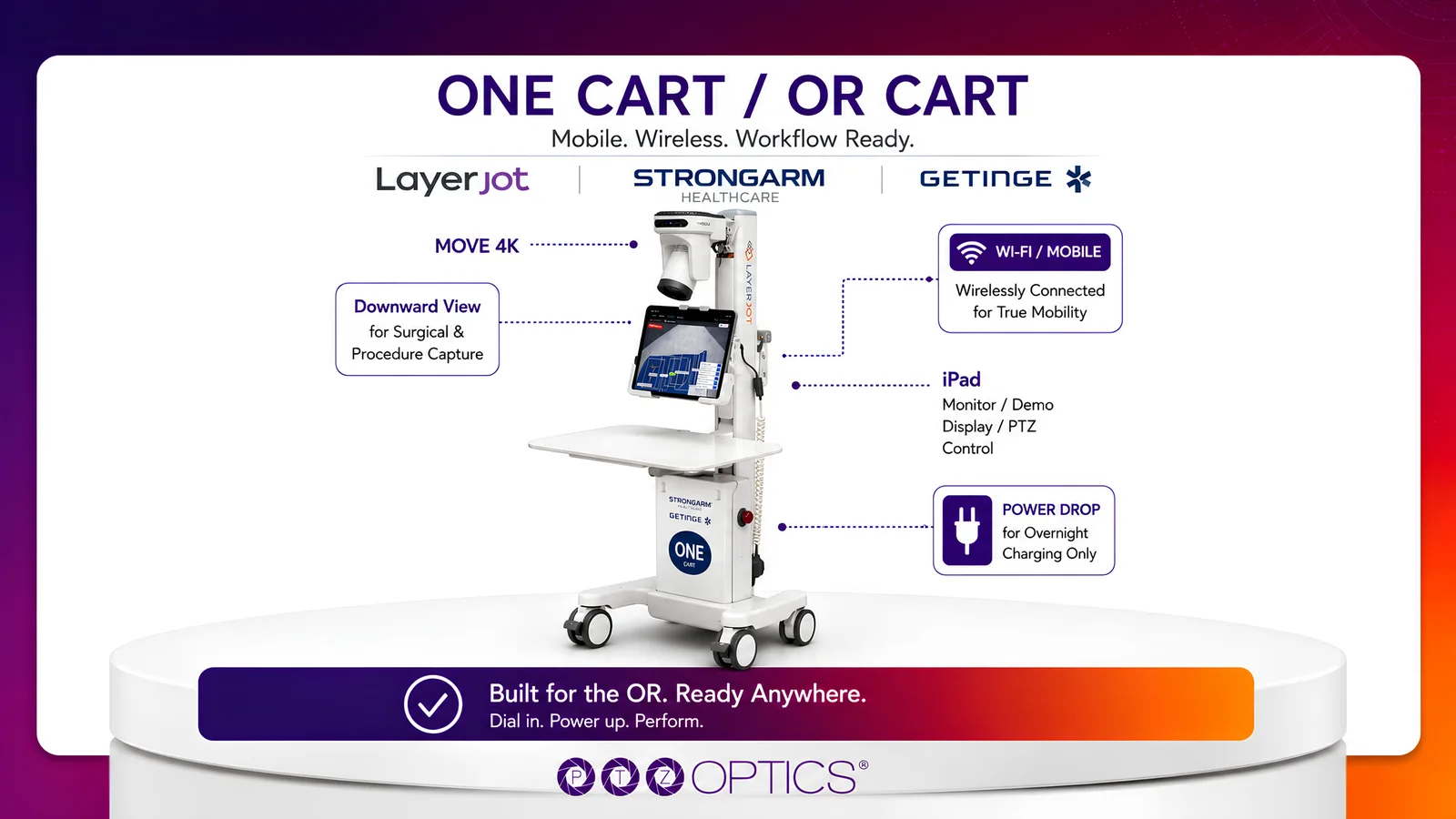
Mobile, battery-powered video workflow built for clinical environments. PTZOptics provides the video capture layer; LayerJot and OR Stats provide the AI and operational-intelligence layer.
The Setup
Mobile Healthcare Cart
LayerJot / Strongarm / Getinge healthcare cart. Battery-powered — it can be unplugged, rolled into the operating area, and plugged back in to charge between cases.
Move 4K Overhead Capture
Move 4K mounted on the cart, pointed down at the operating tray. Clear, broadcast-quality video of surgical tools, instrument layout, and procedural workflow.
OR Stats AI
Computer vision AI captures real-world instrument and supply usage data automatically — no human observer needed in the room.
LayerJot Software Layer
The broader visual-intelligence platform. OR Stats lives inside LayerJot, powered by LayerJot.
Headline Messaging
Lead Headline
“Move the video where care happens.”
Supporting Lines
- “Move the camera workflow where care happens.”
- “Mobile video capture for clinical environments.”
- “Surgical tray visibility, wherever the cart is needed.”
- “A movable healthcare workflow powered by intelligent video.”
Talk Tracks — Pick the One That Fits
Balanced (default)
“This is a mobile OR video workflow. The cart can move where it’s needed, run on battery, and provide a clear camera view of the surgical tray or clinical workspace. LayerJot and OR Stats bring the AI and operational intelligence layer; PTZOptics provides the high-quality video capture that makes that intelligence possible.”
Shorter
“This setup shows how PTZOptics video can support healthcare workflows. A Move 4K camera gives a clear view of the operating tray, while LayerJot and OR Stats use computer vision AI to turn usage data into operational insight.”
Partner-Forward
“This gives us a strong healthcare story with LayerJot, Strongarm, and Getinge. It shows why quality video matters in clinical workflow applications — especially when the goal is to capture reliable data and support operational improvement.”
PTZOptics’ Role in This Story
“Better video creates better visibility. Better visibility creates better data.”
Don’t try to own the entire healthcare AI story. The strong positioning is that PTZOptics provides the video quality and camera workflow that makes the AI layer more useful. Stay in your lane — that’s where you win.
OR Stats — Turn Usage Data into Operational Excellence
If a customer wants to go deeper, here’s the story OR Stats tells. You don’t need to memorize all of it — just enough to bridge into the right partner conversation.
The Problem They Solve
Many surgical trays contain more instruments than are actually used in a procedure. That creates unnecessary work, clutter, supply waste, and added operational cost. Optimizing trays is hard because nobody has objective usage data — until now.
Key Challenges (Use as Bridge Talk)
Wasted Labor
SPD techs spend time cleaning instruments that were never used.
Case Cart Inefficiency
Over-packed carts crowd the OR and increase runner requests.
Supply Waste & Expiration
Disposables get opened and unused, or expire in inventory.
Escalating Utility Costs
Excess instrument volume drives water, chemical, and energy use through unnecessary sterilization.
Subjective Decisions
Without objective data, optimization recommendations face team resistance.
How OR Stats Solves It
Automated Data Capture
SmartScanner technology identifies instrument and supply usage automatically.
Intelligence at Scale
Monitoring multiple rooms accelerates data collection and analysis.
Objective Optimization
Data-driven recommendations help reduce unnecessary tray and case cart volume.
Zero-Installation Footprint
Standalone, battery-operated observation cart — doesn’t interrupt existing OR workflows.
Financial Resource Recovery
Usage data helps hospitals identify operational savings — only process what teams actually need.
✓ DO — Healthcare Talk Track
“Mobile clinical video workflow.”
Frame it as a video workflow, not a medical device.
“Better video makes the AI more useful.”
This is the PTZOptics wedge in healthcare. Stay there.
“Move 4K supports surgical-tray visibility, training, review, and documentation.”
These are the safe use cases.
“LayerJot, OR Stats, Strongarm, Getinge own the clinical and AI layers.”
Always defer to the partners on diagnostic / clinical questions.
✗ DON’T — Healthcare Guardrails
Never make medical claims
No diagnostic claims. No treatment claims. No outcome claims. We are a video workflow, not a medical device.
Never claim regulatory clearance
No FDA, no CE-Medical, no IEC 60601 unless product team has approved that statement in writing.
Never own the AI story alone
Computer vision AI accuracy and clinical utility belong to LayerJot / OR Stats. Bridge to them on AI questions.
Never speculate on hospital deployment
Procurement, IT security, clinical workflow integration — all belong to the partners. Hand off cleanly.
Partner Handoff
For Deeper Clinical / Regulatory / Procurement Questions
If a customer wants to go beyond “great video for OR workflows” — into clinical decision-making, regulatory clearance, hospital procurement, or AI accuracy — hand off to LayerJot or OR Stats directly.
For PTZOptics-side follow-up: partners@ptzoptics.com • 484-593-2247
Visual Reasoning AI
Marketing Initiative
PTZOptics' initiative to help the video industry move into the next wave of innovation — where cameras don't just capture video, but help systems understand it and take action.
What Is Visual Reasoning?
Visual reasoning is the ability for a system to look at a camera image and answer questions about it in natural language. Point a PTZOptics camera at a conference stage and ask: "Is someone at the podium?" The system answers yes or no. Ask "How many people are seated?" and you get a number.
The technology is powered by a Vision Language Model (VLM) called Moondream. You describe what you want in English. The AI handles the rest. It works with our open HTTP API — no new firmware, no hardware changes, no additional licensing.
Track Anything by Description
"Follow the speaker in the blue jacket." No markers, no retraining. Just a text prompt and the camera follows.
AI Color Matching
Analyzes scene color and recommends camera adjustments. Multi-camera color matching in one click.
Intelligent Framing
AI suggests composition improvements and can execute them through PTZ control automatically.
Why We're Doing This
Industry Is Shifting
AI is becoming part of production workflows. Customers want more automation. Integrators need faster, more flexible ways to build solutions.
Leading, Not Reacting
Visual Reasoning is our way of leading that shift. We're educating the market, working with AI partners, enabling developers, and making sure our cameras are easy to build on.
How It Connects to What We Sell Today
Everything starts with Move 4K + Horizon:
Move 4K
High-quality cameras with precise PTZ control and a fully documented open HTTP API.
Horizon
Control, automation, and integration software foundation that Visual Reasoning builds on.
That's the foundation. Visual Reasoning builds on top by enabling smarter tracking, automated workflows, event-based actions, and deeper AI integrations.
What Makes PTZOptics Different
Partner Ecosystem
We partner with companies building real AI tools — not trying to do it all ourselves.
Open API, Not Locked In
We support developers and integrators. Our cameras are easy to build on. No proprietary lock-in.
Real Workflows
We focus on sports, broadcast, pro AV — real production environments, not tech demos.
Industry Positioning
This positions PTZOptics alongside leading tech and AI companies — not just camera manufacturers.
Quotes on Visual Reasoning
"PTZOptics has built a strong foundation for intelligent camera workflows, and this collaboration shows how our lightweight visual AI can add a new layer of understanding to live production. Together, we're demonstrating a practical step beyond ball tracking, where video can be interpreted and acted on as the action unfolds."
— Jay Allen, CEO, Moondream
"Visual Reasoning is about giving cameras the context they need to make smarter production decisions. Working with Moondream helps us show what happens when cameras do more than follow the ball — they begin to understand the play and respond to it in real time."
— Claudia Barbiero, Director of Global Marketing, PTZOptics
How to Explain It to Customers
"Visual Reasoning is how PTZOptics is helping the industry move toward smarter, more automated video workflows. It builds on the cameras and control systems you can buy today and makes sure you're ready for what's coming next."
Key Takeaways for Sales
Industry Leadership
This is about leading the market, not just listing features.
Current Products More Valuable
Visual Reasoning makes Move 4K + Horizon more valuable — not obsolete.
Future-Proof
Helps customers future-proof their workflows and investments.
Integrator Opportunity
Gives integrators more flexibility and new business opportunities.
Press & Resources
PTZOptics Blog
Videomaker
The Book
Visual Reasoning AI for Broadcast and ProAV by Paul Richards
Hive Studio
Remote Production Platform
What to Say
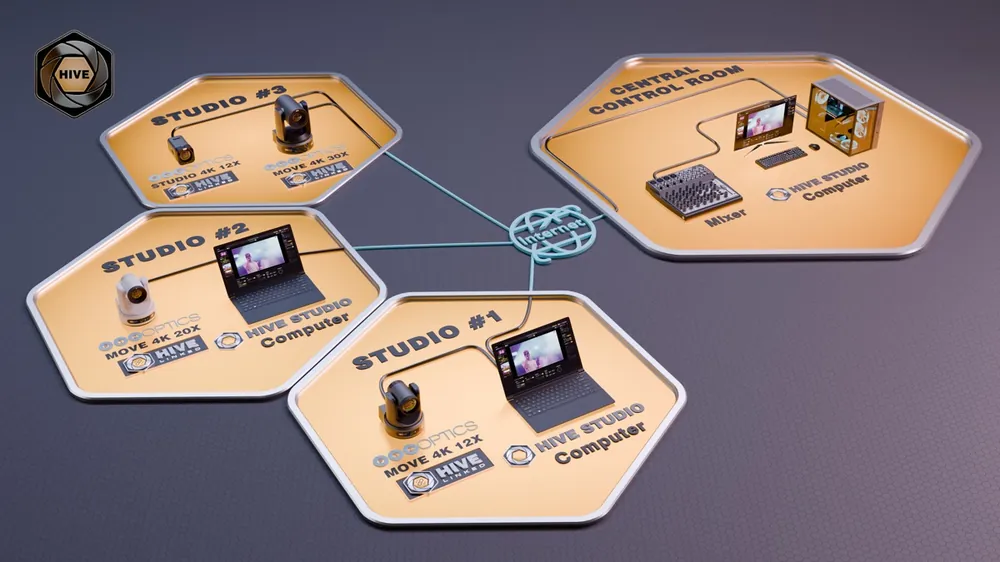
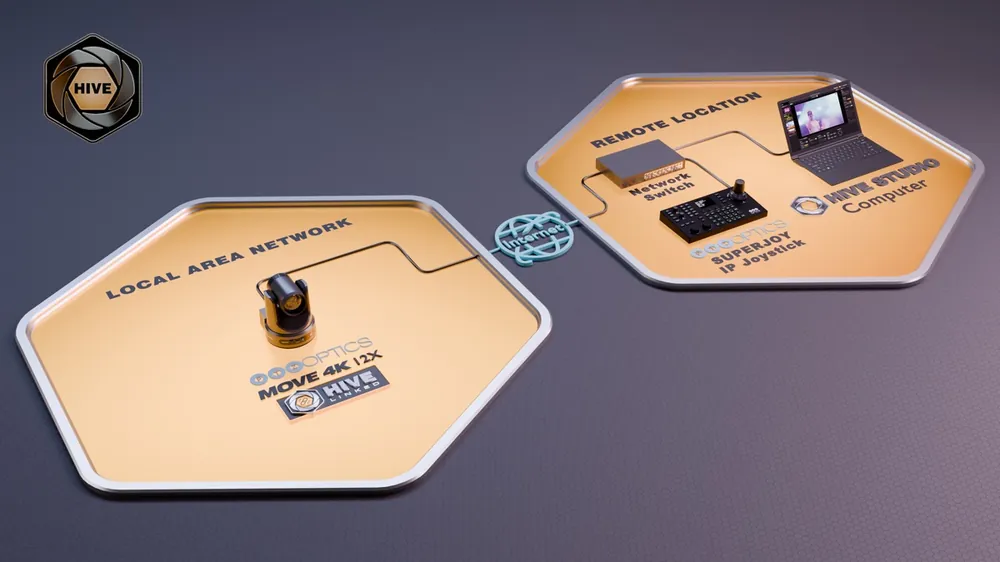
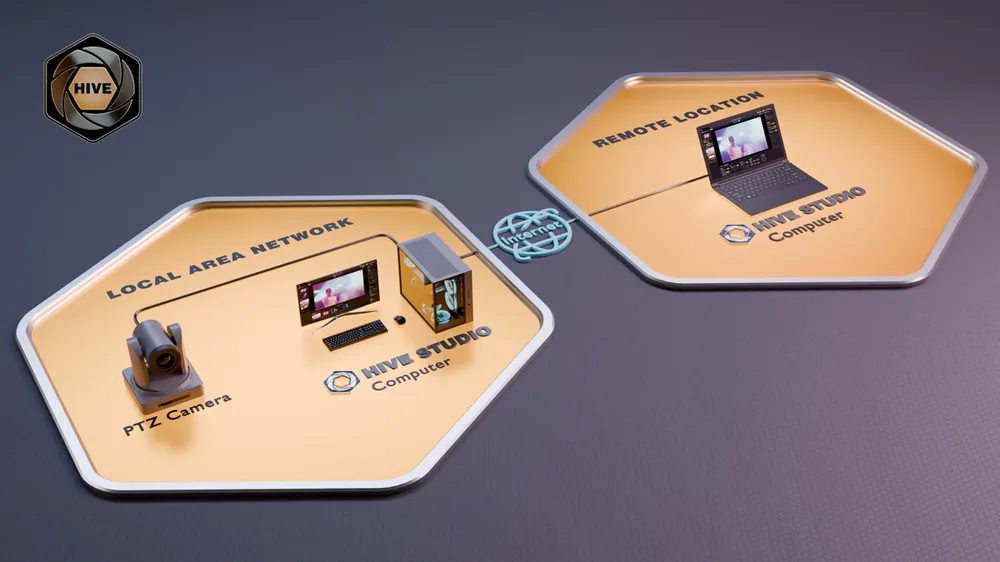
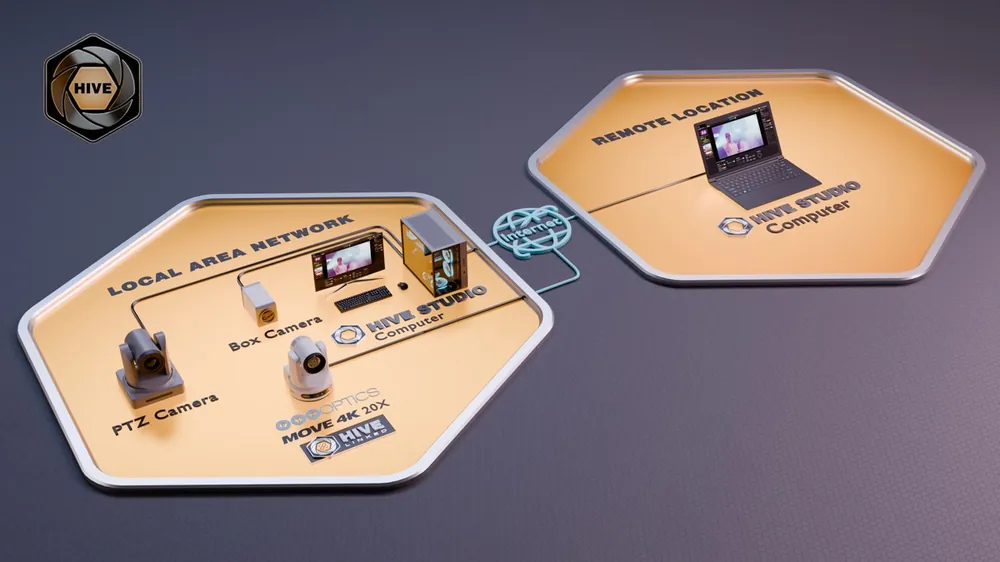
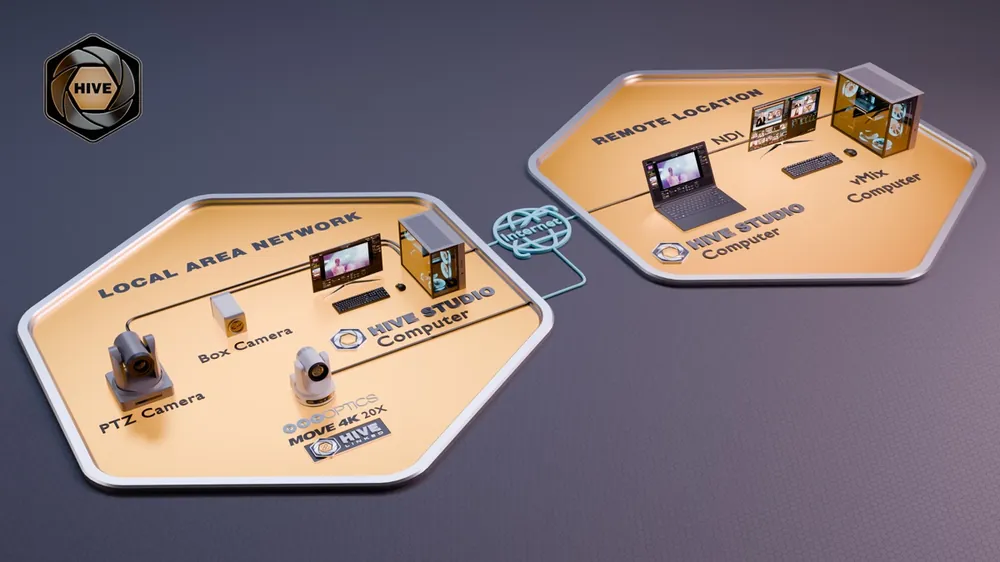
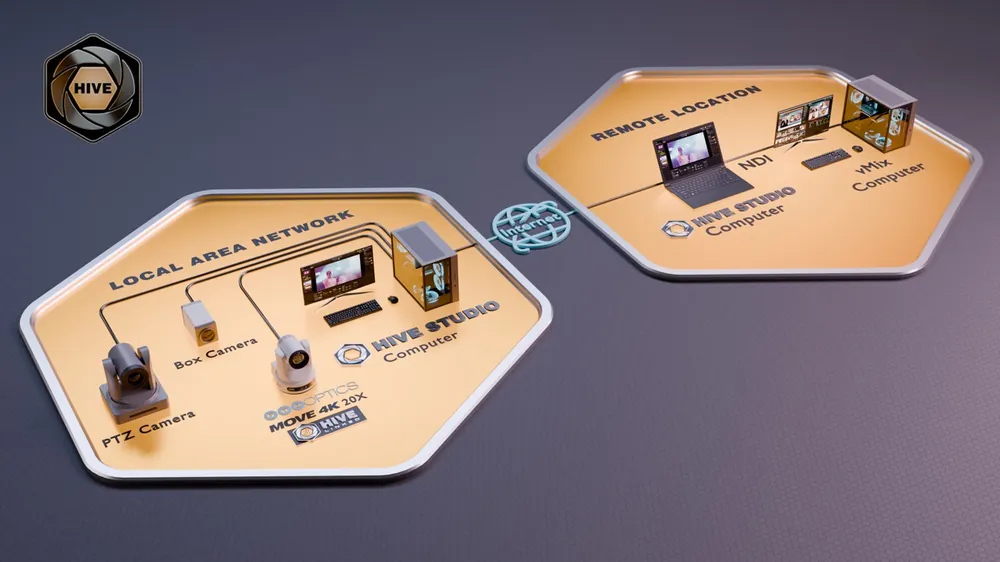
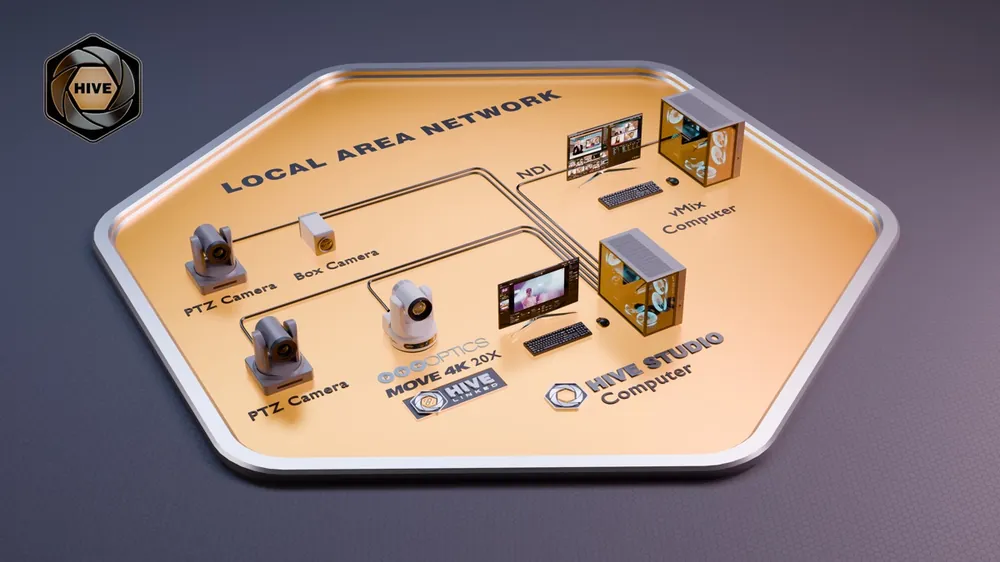
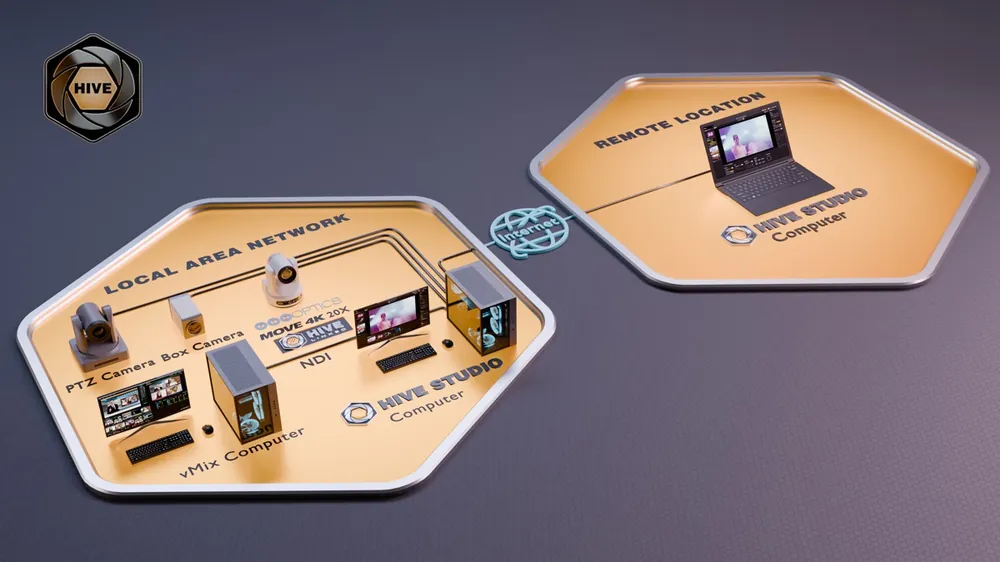
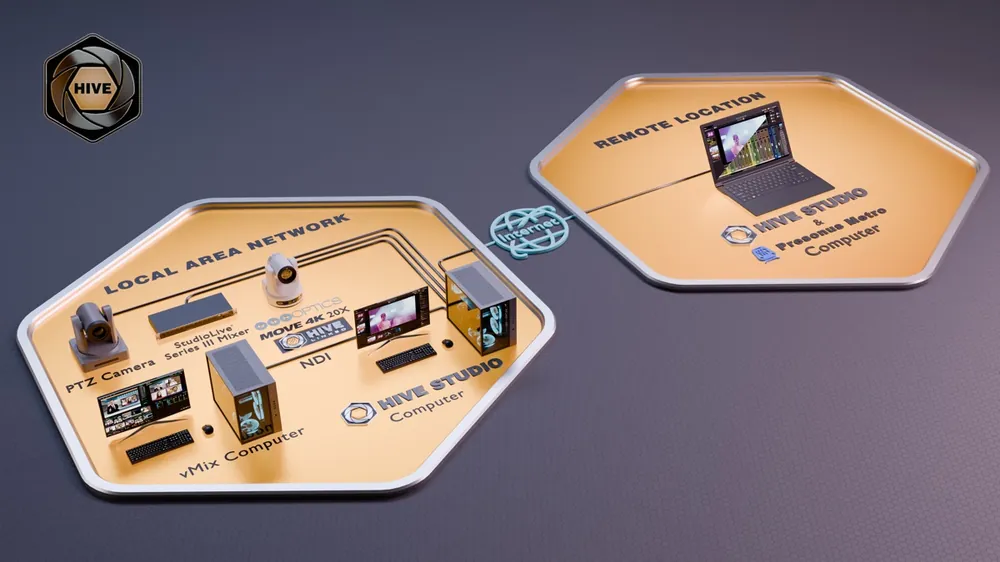
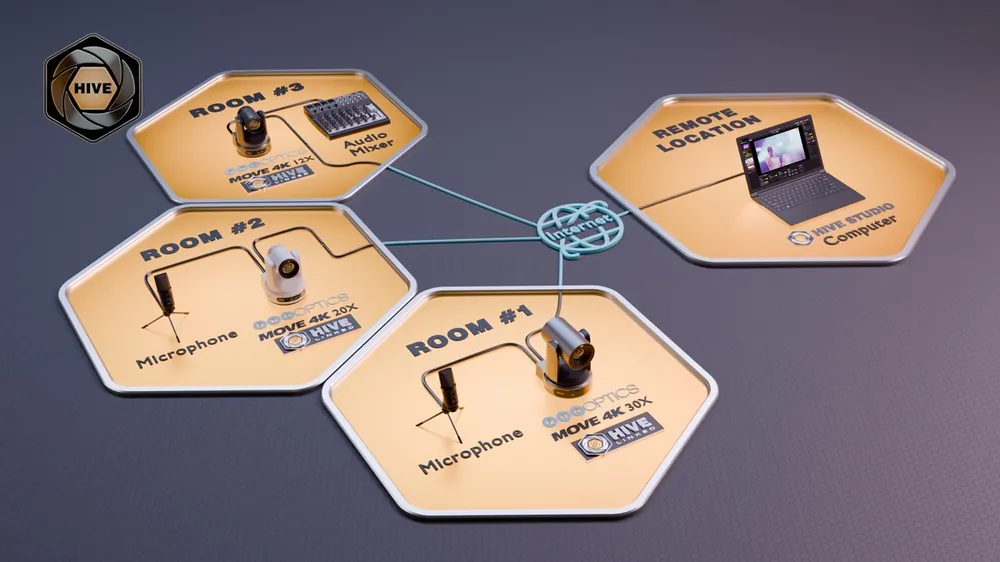
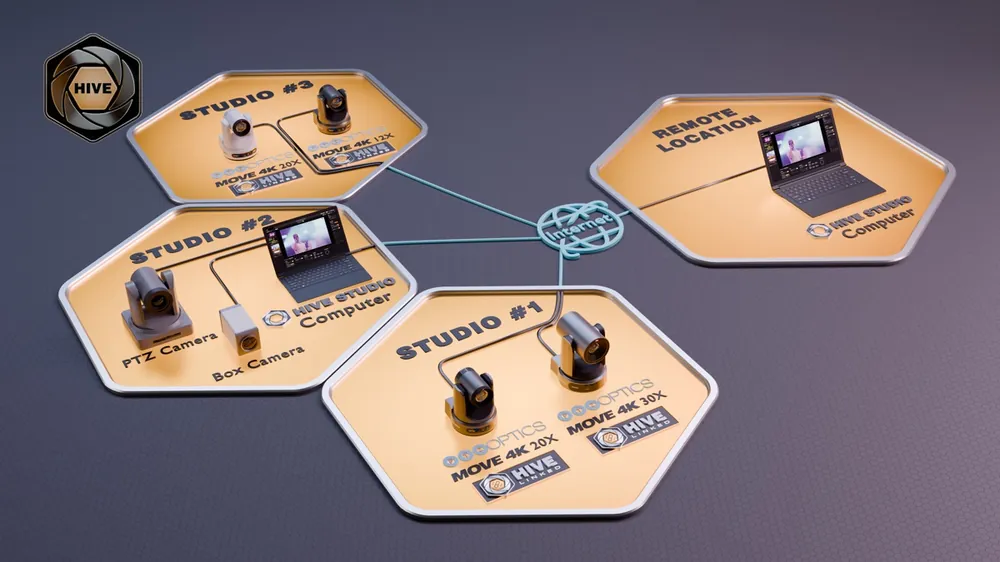
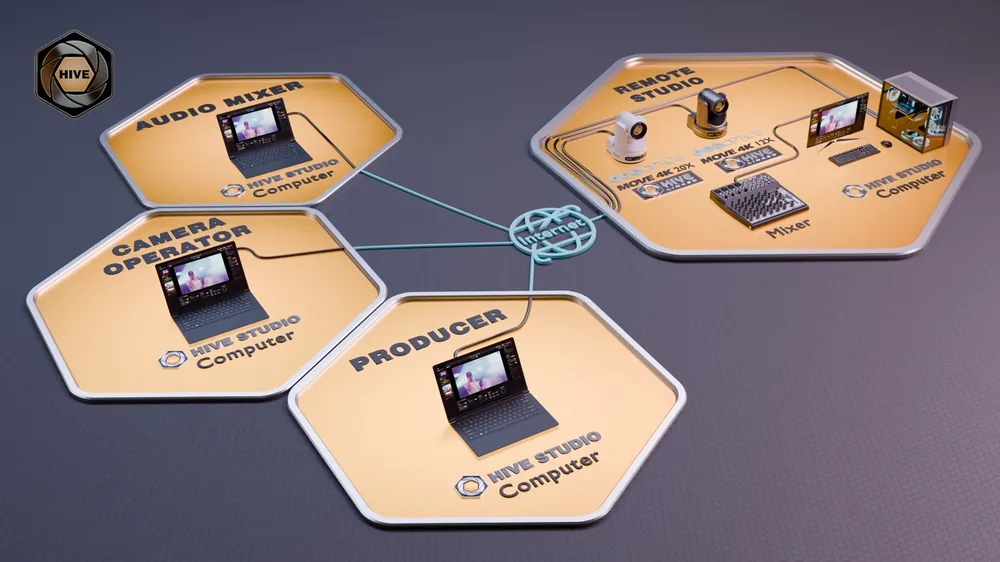
Hive Studio is the PTZOptics platform for customers who want to control cameras remotely, manage multi-camera workflows more efficiently, and support teams working across different locations.
Best Fit
Bring up Hive Studio when the customer asks about remote control, multi-room workflows, cloud-based management, remote operators, mixed-brand camera environments, or scaling beyond a single control room.
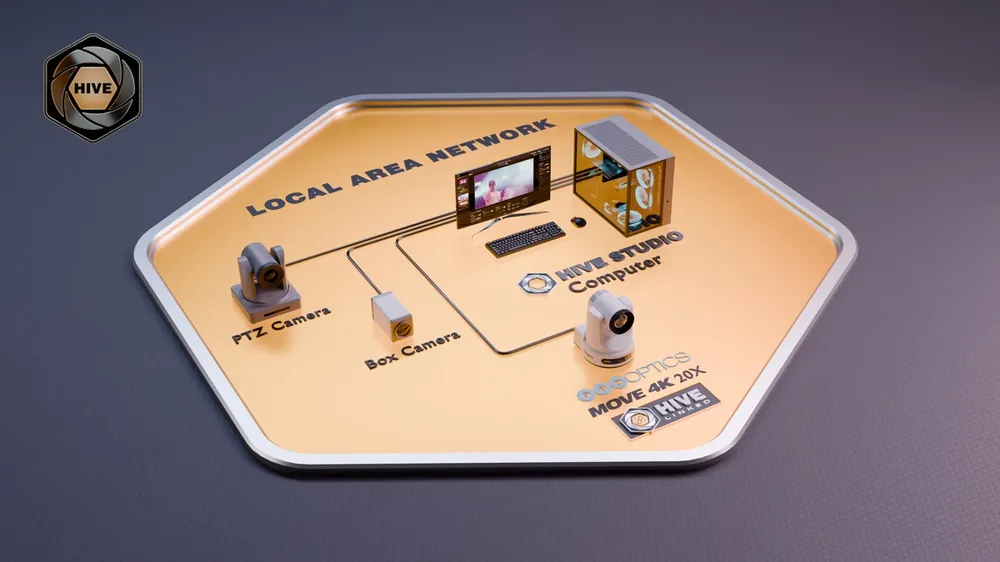
Workflow Diagrams
Swipe to browse • 13 diagrams
Quick Pricing Reference
PT-HIVE-BASIC
Free
1 camera max
3 team members max
5 GB monthly included
Good fit: very small deployments, trial users, early-stage evaluation
PT-HIVE-STD
$25 monthly / $270 yearly
3 cameras max
5 team members max
58.5 GB monthly included
$0.40 per GB overage
Good fit: small teams, basic multi-camera workflows, entry-level cloud usage
PT-HIVE-PRO
$99 monthly / $999 yearly
8 cameras max
10 team members max
249.75 GB monthly included
$0.35 per GB overage
Good fit: heavier users, larger teams, more active multi-camera environments
PT-HIVE-ENTERPRISE
Yearly Price: Contact Sales
Unlimited cameras
Unlimited team members
$0.35 per GB overage
Good fit: larger deployments, customized workflows, higher-scale production environments
Top Value Adds
Instant Camera Discovery
Add any camera model or brand in seconds through Hive Studio's auto-discovery feature.
Customized Controls
Whether using an Xbox controller or StreamDeck, customers can build a workflow with personalized hotkeys around how they actually operate.
Cross-Brand Compatibility
Hive is not limited to PTZOptics or PTZ cameras. It supports a growing list of more than 400 major camera models.
Unified Interface
Camera management is simpler with a user-friendly interface that adapts to the make or model of camera being used.
What Impacts Price
Key Pricing Drivers
Number of cameras
Number of team members
Cloud usage
Remote operator locations
Bitrate / bandwidth usage
Important Note
Local LAN mode usage is free and should not be part of cloud cost positioning. Cloud Mode is what drives usage estimates in the calculator.
When to Bring Up Hive Studio
Signals to Listen For
"We want to control cameras from another room."
"We have multiple locations."
"Our team is not always on site."
"We need a better way to manage several cameras."
More Signals
"We use different camera brands."
"We want custom control options."
"We want to scale without adding more complexity."
"We're looking at remote production workflows."
Positioning Summary
What Hive Studio Is
A remote camera production and management platform.
What Problem It Solves
It helps customers centralize control, support distributed teams, manage different camera types more efficiently, and simplify remote workflows.
What It Adds
It moves the conversation from just cameras to a broader production workflow solution.
How to Connect It to PTZOptics Gear
PTZOptics Cameras
Start with the camera deployment.
Controllers & Workflow Tools
Talk through how the customer is currently operating or planning to operate the system.
Hive Studio
Position it as the layer that helps manage, control, and scale the workflow more effectively, especially with multiple operators, rooms, or brands.
Best Customer Types
Strong Fit
Education
Corporate
Houses of worship
Government
Broadcast / media
Live events
Multi-campus organizations
Multi-room installations
Especially Good Fit When
Operators are remote
Teams are distributed
There are multiple cameras to manage
The customer wants a cloud-based workflow
The customer is planning to scale
The customer has mixed camera brands
The customer wants flexible control hardware
Fast Talking Points
Core Points
Remote camera control from anywhere
Instant camera discovery
Unified interface across makes and models
Better support for distributed operators and teams
Differentiators
Customized controls with devices like Xbox controller or StreamDeck
Cross-brand compatibility across 400+ camera models
Easier path to scaling multi-camera environments
Extends the value of PTZOptics camera deployments
Objection Handling
Key Takeaways for Reps
Hive Studio Pricing Estimator
Use this calculator to estimate costs for Cloud Mode. Local LAN mode usage is free.
| Camera | Hours/Day | Days/Week | Preset | Mbps |
|---|
Device Manager
Discover and manage all PTZOptics devices on your network • Part of Horizon Hub
What is Device Manager?
Device Manager is PTZOptics' deployment management tool for finding and identifying sources on the network and updating PTZOptics equipment at once.
Core messages:
- Find and identify sources on the network
- Update PTZOptics equipment at once
- Simplify deployment management
Key Features
- Discover all PTZOptics equipment and other devices on your local network
- Monitor firmware versions across your entire fleet
- Preview live camera feeds
- Update PTZOptics equipment at once and keep devices up to date
- Scalable from single-room installs to multi-camera environments
Part of Horizon Hub
Horizon Hub is the desktop home for PTZOptics software applications and works with all PTZOptics PTZ cameras. Install and update Device Manager alongside Desktop Control and Voice Tracking from one application.